Court typing tests · exam-grade scoring

Practice typing the way the exam tests it.

Build real speed and accuracy on exam-style passages with live WPM, instant mistake highlighting, and court/government-grade scoring — then track every result.

Free to start No download Web · Android · iOS · Windows
live-test · english Try it
0 wpm
Net speed
100%
Accuracy
0s
Time
Click and start typing ⌨ live WPM & accuracy, just like the exam
Result
0
Gross 0 Accuracy 0% Mistakes 0

A quick taster, scored letter-by-letter. Real tests use full court/government-style grading.

Esc resets

Why Typing Teacher

Everything you need to pass the typing test

Live WPM & accuracy

Gross and net WPM and accuracy update as you type — exactly like the real exam screen.

Exam-grade scoring

Court / government-style grading with full- and half-mistake rules and configurable targets.

Real exam passages

Curated passages and timed live tests that mirror the actual format, in English and Hindi.

Track your progress

Test history, streaks and stats so you can watch your speed and accuracy climb over time.

Web, desktop & mobile

One account across the browser, Windows desktop, Android and iOS — practice anywhere.

Focused practice

Lessons and drills that build accurate muscle memory without the noise or distractions.

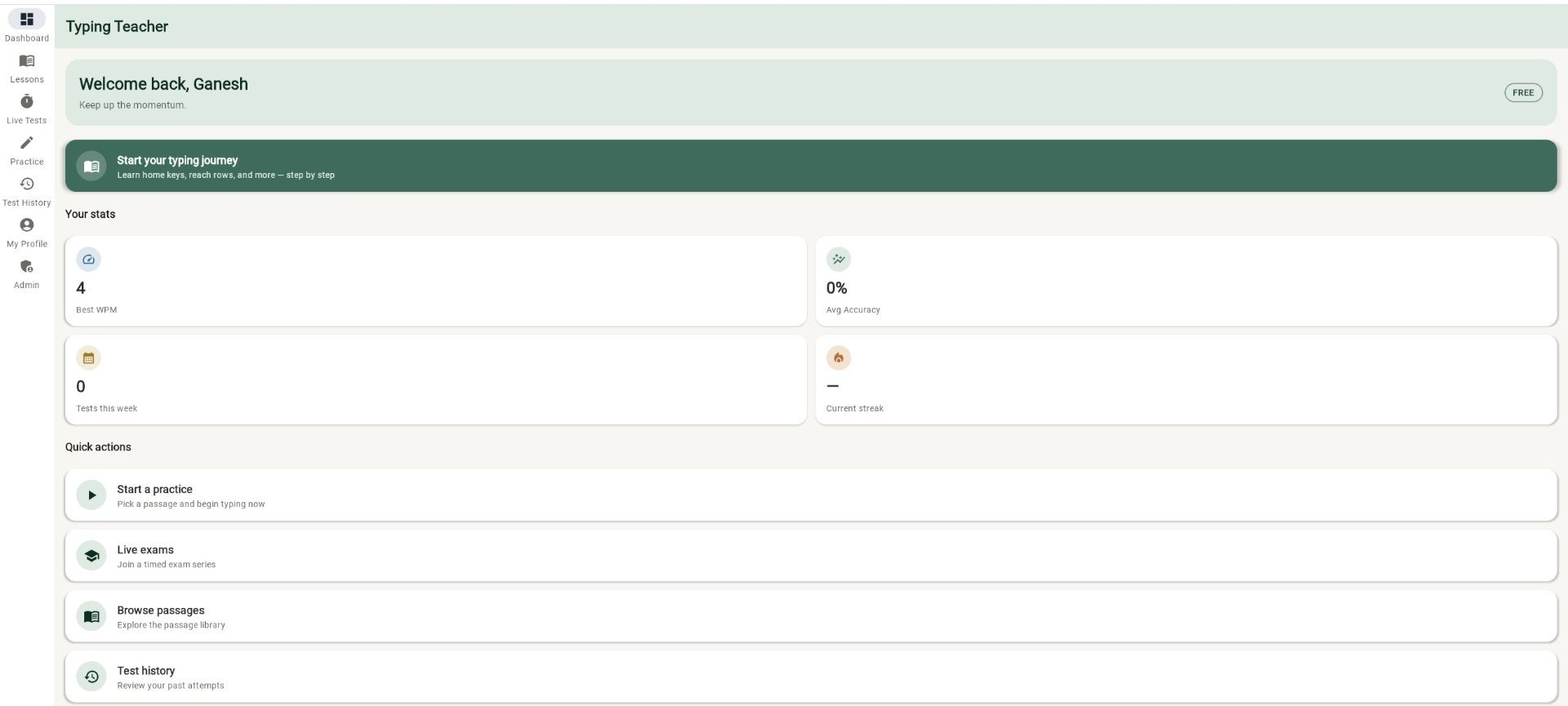
Inside the app

See exactly what you'll be practising on

From your dashboard to a full court-style result breakdown — this is the real product.

How it works

Three steps to a better score

  1. 1

    Pick a passage or live test

    Choose a practice passage to warm up, or join a timed, exam-style test with real pressure.

  2. 2

    Type with live feedback

    Watch WPM and accuracy update in real time while mistakes are highlighted as you go.

  3. 3

    Review your result

    Get a full breakdown — speed, accuracy, mistakes — and track it to keep your streak alive.

Built for your exam

Practice presets tuned to the test you're taking

Pick a preset to match the format, then fine-tune the targets to your exam's official notification.

Court typing tests Available now
  • High Court & District formats
  • Full- and half-mistake grading
  • Timed passages with accuracy gate
SSC CGL / CHSL Coming soon
  • Data Entry Speed Test format
  • English & Hindi passages
  • Key-depression & mistake counting
Police & State clerical Coming soon
  • Steno & junior assistant practice
  • Bilingual passage library
  • Accuracy-first scoring
RRB & PSU Coming soon
  • Set your own speed & accuracy targets
  • Backspace & error rules you control
  • Repeatable timed tests

Court typing tests are live now — more exam formats are on the way.

Plans

Start free. Go Pro for deeper analytics.

Sign in with Google and practise for free. Pro unlocks advanced analytics and the full premium library.

Free
₹0 / forever
  • Free practice passages & live tests
  • Live WPM & accuracy as you type
  • Full result breakdown & marks
  • Test history across all devices
Sign in with Google →

Pro plans are tailored to you — get in touch and we'll help you pick the right one.

FAQ

Questions, answered

Is Typing Teacher really free?
Yes — sign in with Google and you can practise passages, take free live tests, and see your live WPM, accuracy and full result breakdown at no cost. Pro adds advanced analytics (WPM curves, keyboard heatmap, consistency) and the full premium library — contact us for pricing.
Which exams does it cover?
It's built for typing tests like SSC CGL/CHSL (DEST), court typing tests, police and state clerical exams, and RRB/PSU roles. You can also set fully custom speed and accuracy targets for any test.
Does it support Hindi typing?
Yes. Both English and Hindi passages are available so you can practise in the language your exam uses.
How is the score calculated?
You get gross and net WPM plus accuracy, graded with court/government-style full- and half-mistake rules. Targets are configurable so practice matches your exam's official criteria.
Do I need to install anything?
No. It runs right in your browser. There are also Windows desktop, Android and iOS apps if you prefer, all synced to one account.
Is my progress saved across devices?
Yes — sign in and your test history, streaks and stats sync across web, desktop and mobile.

Ready to type faster?

Sign in free with Google and your first scored test is a couple of minutes away — no install required.

Launch Typing Teacher