Free Court typing tests · exam-grade scoring

Practice typing the way the exam tests it.

Train on exam-style passages with live gross & net WPM, instant mistake highlighting, and court-style grading — full and half mistakes, marks, and a pass/fail verdict on every test.

Free to start No download Web · Android · iOS · Windows
live-test · english Try it
0 wpm
Net speed
100%
Accuracy
0s
Time
Click and start typing ⌨ live WPM & accuracy, just like the exam
Result
0
Gross 0 Accuracy 0% Mistakes 0

A quick taster, scored letter-by-letter. Real tests use full court/government-style grading.

Esc resets

Why Typing Teacher

Everything you need to pass the typing test

Live WPM & accuracy

Gross and net WPM and accuracy update as you type — exactly like the real exam screen.

Court-style grading

Five error categories — omission, substitution, addition, spelling and half mistakes — with marks and a clear pass/fail verdict.

Multi-phase live exams

Timed exam series with keyboard test, demo and final phases — the full exam-day experience, with real pressure.

Typing lessons & drills

A guided journey from home keys to capitals and punctuation, with drill and exercise rounds that build muscle memory.

History, streaks & leaderboards

Every attempt saved with its full breakdown — keep a daily streak going and see where you rank on live tests.

Web, desktop & mobile

One account across the browser, Windows desktop, Android and iOS — practice anywhere, progress syncs everywhere.

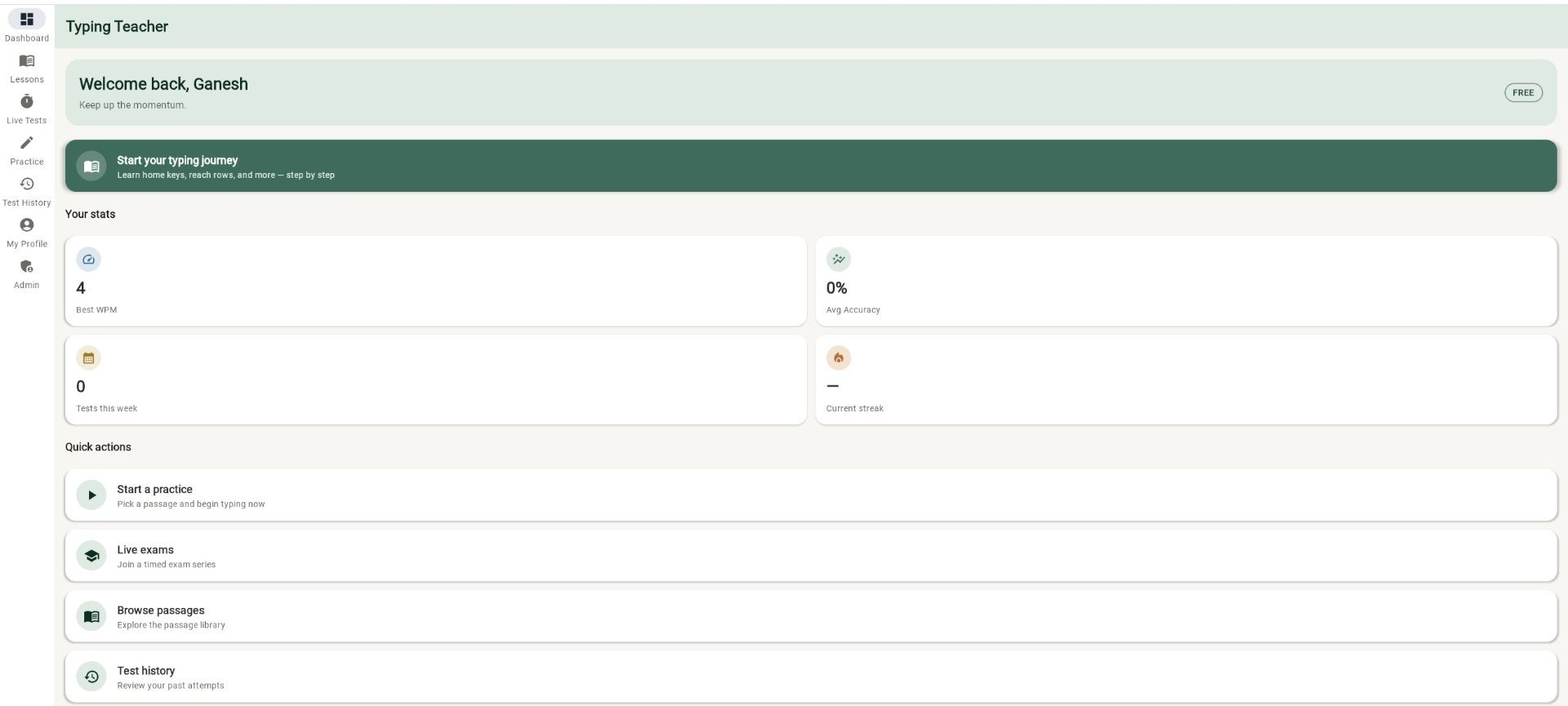
Inside the app

See exactly what you'll be practising on

From your dashboard to a full court-style result breakdown — this is the real product.

How it works

Three steps to a better score

  1. 1

    Pick a lesson, passage or live test

    Learn from scratch with guided lessons, warm up on a practice passage, or join a timed exam-style test.

  2. 2

    Type with live feedback

    Watch gross and net WPM and accuracy update in real time, with mistakes highlighted and exam-style backspace rules.

  3. 3

    Review your result

    Get a full breakdown — speed, accuracy, every error by category, marks and verdict — and keep your streak alive.

Built for your exam

Practice presets tuned to the test you're taking

Pick a preset to match the format, then fine-tune the targets to your exam's official notification.

Court typing tests Available now
  • High Court & District formats
  • Full- and half-mistake grading with configurable weights
  • Marks & pass criteria set to your exam notification
  • Multi-phase series: keyboard test, demo & final
More languages Coming soon
  • Hindi & Marathi passage libraries
  • Remington keyboard layout practice
  • Same court-grade scoring in every language
GCC-TBC (MSCE Pune) Coming soon
  • English, Marathi & Hindi at 30 and 40 WPM
  • Speed passage plus letter, statement & email practicals
  • Objective + practical pattern with real pass criteria
SSC CGL / CHSL Coming soon
  • Data Entry Speed Test format
  • Key-depression & mistake counting
  • Repeatable timed tests

Court typing tests are live now — more exam formats and languages are on the way.

Plans

Start free. Go Pro for deeper analytics.

Sign in with Google and practise for free. Pro unlocks advanced analytics and the full premium library — from just ₹29.

Free
₹0 / forever
  • Free practice passages & live tests
  • Typing lessons journey — home keys to punctuation
  • Live WPM & accuracy as you type
  • Full result breakdown, marks & verdict
  • Upload 1 custom passage of your own
  • Test history across all devices
Sign in with Google →

Want help picking a plan? Get in touch and we'll set you up.

FAQ

Questions, answered

Is Typing Teacher really free?
Yes — sign in with Google and you can practise passages, take free live tests, and see your live WPM, accuracy and full result breakdown at no cost. Pro adds advanced analytics (WPM curves, keyboard heatmap, consistency) and the full premium library, starting at just ₹29 for a day — with monthly, 3-month and 6-month plans too. Contact us to upgrade.
Can I practice with my own passages?
Yes — upload a custom passage and practice on it with the same live metrics and court-style grading as any other test. The Free plan includes 1 custom passage; Pro lets you keep up to 25.
Which exams does it cover?
Court typing tests are fully supported today, with multi-phase live exams that mirror the real format. GCC-TBC (MSCE Pune) and SSC CGL/CHSL (DEST) formats are coming soon — and you can already set fully custom speed and accuracy targets for any test.
Which languages are supported?
English passages and exams are available today. Hindi and Marathi passage libraries, with Remington keyboard layout practice, are coming soon.
How is the score calculated?
Gross WPM counts every five keystrokes as a word per minute; net WPM subtracts your weighted mistakes. Errors are graded in five categories — omission, substitution, addition, spelling and half mistakes — and converted into marks and a pass/fail verdict against your exam’s configurable criteria.
Do I need to install anything?
No. It runs right in your browser. There are also Windows desktop, Android and iOS apps if you prefer, all synced to one account.
Is my progress saved across devices?
Yes — sign in and your test history, streaks and stats sync across web, desktop and mobile.

Start your typing journey

Sign in free with Google and your first scored test is a couple of minutes away — no install required.

Launch Typing Teacher